Claim your free Custom outbound action plan
White check mark inside a green rounded square button.
Success! Your custom action plan will be emailed in 5 mins
Oops! Something went wrong while submitting the form.
Transparent eyeglasses with thin black frames and a subtle purple reflection on the lenses.
The best GTM content from across the internet - curated daily, all in one place.
GTM News Feed
2.8K Posts
Share GTM News Feed
Bookmark The Feed
Newsletter
Go-to weekly newsletter for GTM operators, packed with actionable tutorials, tools, tips, templates, and free resources you can use immediately.
Top Contributors
Felix Frank
Penn Frank
Petr Kaliuzhny
Tyce Hilton
Nick Abraham
Eric Nowoslawski
Patrick Spychalski
Brigitta Ruha
Alan Ruchtein
Can Timağur
Nick Palasz
Adam Robinson
Tim Yakubson
Josh Whitfield
Alex Fine
Varun Anand
Harris Kenny
Kellen Casebeer
Michael Saruggia
🤖 Jacob Tuwiner
Brandon Charleson
Christian Oland
Matthew Putnam
Arnaud Belinga
Enzo Carasso
Abbas Somji
Mohan Muthoo
Yurii Veremchuk
Aaron Reeves
Hans Dekker
Nolan Ong
Thomas Nagy
Muhammad Rafay
Mark Timothy Agarrado
Done Miladinov
Stefan Mrvic
Load More...
Follow StackOptimise
Eric Nowoslawski
May 29, 2026 3:11 AM
These New Prospecting Filters Are Wild
You can now target companies by who they sell to, keyword searches across the whole website, how companies show up for Google searches and more. Second post about Prospeo's update comes with a… | 🦾Eric Nowoslawski | 12 comments
You can now target companies by who they sell to, keyword searches across the whole website, how companies show up for Google searches and more. Second post about Prospeo's update comes with a video so you can see it here. They asked me what filters would I want to see in the platform and they added so much great stuff. Filter for companies that sell to small business owners, or sell to legal teams, or sell to marketing, plus the size of the companies they sell to and the market they're in. And other things like - 1. Keyword search now reads the whole website — page bodies, titles, URLs, SEO descriptions — not just the company description. Huge difference in recall. 2. Business-model and type filters: SaaS, marketplace, e-comm, agency, consulting, manufacturing, plus flags like "has a public pricing page," "has an enterprise plan," "usage-based pricing." 3. AI attributes: do they offer a demo, do they have an API, do they have a blog. 4. Google Discovery: find companies by who ranks for a given keyword. All of it is in the API, not just the UI. Honest read on data quality: for a quick, well-defined list it's great. If you need a complete TAM exactly to spec, still pull the broad list and run your own website prompts to finish it. As a fast starting point, I haven't seen filters like this anywhere else. I go over all of the updates in the video update here. | 12 comments on LinkedIn
Linkedin.com
Kellen Casebeer
May 29, 2026 3:07 AM
Why “It Worked” Is a Dangerous Conclusion
9 out of 10 teams run an outbound campaign, look at the positives, and ask “did it work?”
9 out of 10 teams run an outbound campaign, look at the positives, and ask “did it work?” If yes they re-load it and run until the answer is “no” They’re reactive When it arrives at “no”, whether immediately or eventually, they then ask “what will work?” And go do that Right in front of your blind little eyes - is the answers (or questions) to your problems You launch to 1000 people and get 2 positives “It works”…. Really you should be thinking “what did the other 998 think when they saw this?” “What is true of the people who ignored this that isn’t of who said yes?” “What would everyone else had been more interested in?” A bunch of much broader, more vague, yet revealing questions Maybe your idea of who you can help and your actual market are not the same thing Maybe your words for an idea that would be agreeable to your audience don’t make sense, and you think the idea sucks when really you write confusingly Maybe you had an amazing list and copy, domains were cooked, and results are not representative of “the truth” Similarly, you may need to ask “what % of 20 hand raisers for our lead magnet became customers vs the 3 for cold outbound to meetings?” I’ve seen 2 for 3 on cold direct meetings vs 0 for 20 on random freebies Keep your attention focused on what matters (business outcomes), not the half steps But I’ve also seen 0 for 0 on direct meetings, and 3 for 10 on lead magnets; they’re not bad - it’s just a piece of the puzzle Feedback loops = outcomes now serve to inform inputs of tomorrow If your universe of “what is possible?” Exists solely of copy pasting ideas from elsewhere into repos to solve things for you… you’re gonna have a bad time in the future imo… Time will tell; my bet is placed :)
LinkedIn.com
Brigitta Ruha
May 25, 2026 3:05 AM
The 2026 LinkedIn Content Stack
Here are the tools I'd use to run a LinkedIn content engine in 2026.
Here are the tools I'd use to run a LinkedIn content engine in 2026. 28 tools across 7 categories. The full stack: In 2026, posting better + more isn’t enough. It's speed + content themes + supportive content engine that compounds. Here's the full stack by category: 1. Ideation + Research → Apify : Scrape what's working in your niche right now → Perplexity: Synthesized research with citations in seconds → Reddit Pro: Real audience pain language, in their words → Scripe: Top-performing post analysis from creators in your space 2. Writing + Drafting → Claude Code: Long-form drafts in your voice, not generic AI → ChatGPT: Hooks and short-form drafts → Lex: Distraction-free writing with built-in feedback → Hemingway: Tightens sentences before you hit publish 3. Visuals + Design → Nano Banana: Brand-locked carousels and infographics → Figma: Custom visuals when Claude isn't enough → Canva: Quick branded graphics → Loom: Async video for posts that need a face 4. LinkedIn Specific → Taplio: LinkedIn analytics + scheduling in one place → AuthoredUp: Post formatting + preview before you hit publish → MagicPost: Quick post drafts when you're stuck → Ghost Magic: Outlier post inspiration from your niche 5. Distribution + Repurposing → Buffer: Multi-platform scheduling → Typefully: One workspace for LinkedIn, X, threads → Castmagic: Turn calls and webinars into content automatically → Repurposeio: Auto-convert long-form into clips for shorts 6. Pipeline + CRM → Notion: Content pipeline, skill management, internal docs → HubSpot: Capture LinkedIn-sourced leads, track them to revenue → Calendly: Turn DMs into booked calls → Tally: Qualify inbound before discovery 7. Analytics + Optimization → Shield: LinkedIn analytics that go deeper than native → Inlytics: Performance tracking per post and per pillar → Fellow - AI Meeting Assistant: Demo recordings and call analysis → Google Analytics: Track LinkedIn-driven website traffic Tools on my list to try in 2026: → Ryze (content creation workflow) → Cara (creator-first social) → Ease (carousel generator) → Beehiiv (newsletter built on LinkedIn audience) Tools don't build your brand. But with the right stack, you spend 2x less time on writing, editing, and designing. Curious: what's the one tool you'd never give up? P.S. ♻️ Repost if you'd add or swap any of these. Help each other 2x for better + faster content creation. | 98 comments on LinkedIn
Linkedin.com
Mohan Muthoo
May 18, 2026 1:37 AM
The Real Reason Campaigns Die
After running hundreds of campaigns at Spring Drive, I think the single biggest misconception about deliverability is that it's a problem you solve. Its more of an ongoing management project (that…
After running hundreds of campaigns at Spring Drive, I think the single biggest misconception about deliverability is that it's a problem you solve. Its more of an ongoing management project (that never ends lol). There are pre-send checklist items that everyone should be doing. Domain setup, authentication etc. these are table stakes and they're pretty straightforward. We use Zapmail for our infrastructure and they make that part easy. But beyond the checklist stuff, deliverability requires a huge amount of expertise and systemization. Especially around diagnosing problems and knowing when to switch something and when to wait. Sometimes there's genuinely nothing you should do. ESPs are making changes internally, there are broader trends affecting inboxing across the board, and the right move is to not move at all. Mistakes I see people doing instead are usually one of three things: 1. Swapping sequencers, It's almost never that. 2. Jumping from a solid inbox provider to another one because they promised "enterprise-grade infrastructure" or "99.9% deliverability." Those things don't exist. If someone is making that claim, be cautious. 3. Running inbox placement tests and treating them like gospel. These are a red herring. They can't replicate scale, and scale is where deliverability becomes a completely different animal. The other thing people underestimate is how much resource this actually takes. What we do for clients at Spring Drive is keep roughly twice their infrastructure in reserve at any given time. That way we can rotate domains, pull things back when we need to, and maintain pipeline without interruption. It's reading signals and knowing when to act. And honestly, it's also just spending more money. I think this is a big part of why very low-cost agencies in the cold email space will struggle. There's a gap between what deliverability requires and what those price points can support. If you'd like Spring Drive to drive pipeline for your team, book in a chat with us here: https://tally.so/r/7R26PA | 16 comments on LinkedIn
Linkedin.com
Kellen Casebeer
May 15, 2026 1:27 AM
The 3 Stages Every CRM Goes Through
I recently posted about moving The Deal Lab off our old crm and onto Attio.
Today's the next one in the series: how I'm actually building it out. I broke it down in this video. It's worth a few minutes if you've ever spun up a CRM and watched it slowly become a graveyard, or work inside an awful one and want to understand how it got there. The frame I'm working off of: every CRM buildout goes through three stages. Most teams skip stage 1 and crash into stage 3 with no foundation. (That's why your reps hate your CRM.) Stage 1: CRM as a notepad. Three objects. Companies, contacts, deals. Track what you act on, nothing more. Notes, calls, conversations, basic deal stages. This is where I am today. Most teams should start here and stay longer than they think. Basic automations might look like alerting for deals that have not moved in a week, creating a follow-up task after a call, or converting a contact to “customer” if their company closes. Stage 2: CRM as a quarterback. Now you add depth. Contact types, persona tags, company segments, and reporting mapped against them. Revenue per segment. Win rate by persona. The CRM starts telling you where to spend the next hour, not just where you spent the last one. Automations here might route new leads by segment, alert reps when a target account re-engages, or surface which persona is moving deals forward fastest. Stage 3: CRM as the reconciliation layer. Marketing touches, in-person meetings, event attendees, partner intros, ad data. Multiple perspectives on the same human, aggregated into one view. This is where most operators need outside help to do it right. This is also where Attio starts to do a lot of the heavy lifting for you. "Ask Attio" surfaces touches, meetings, and whatever data you want across your CRM. Instead of building the reconciliation layer yourself inside of other tools, it’s part of the core features. Automations here might dedupe people across systems, merge event and campaign history into one record, apply consent rules, or show which source actually created the opportunity. What I cover in the video below: - Why companies, contacts, and deals are the only three objects you need on day 1 - The signal that tells you it's time to move from stage 1 to stage 2 - What I'm wiring in next (GTM Cafe members, partners, subscribers, plus Lemlist + Smartlead + OutboundSync for sequencing) - Why most CRM buildouts fail at the jump from stage 2 to stage 3 Drop a comment on which stage you're stuck in. Episode 3 will probably be shaped by what people are wrestling with most. 🫡
LinkedIn.com
Yurii Veremchuk
May 7, 2026 8:31 PM
10 Things Every SDR Should Know
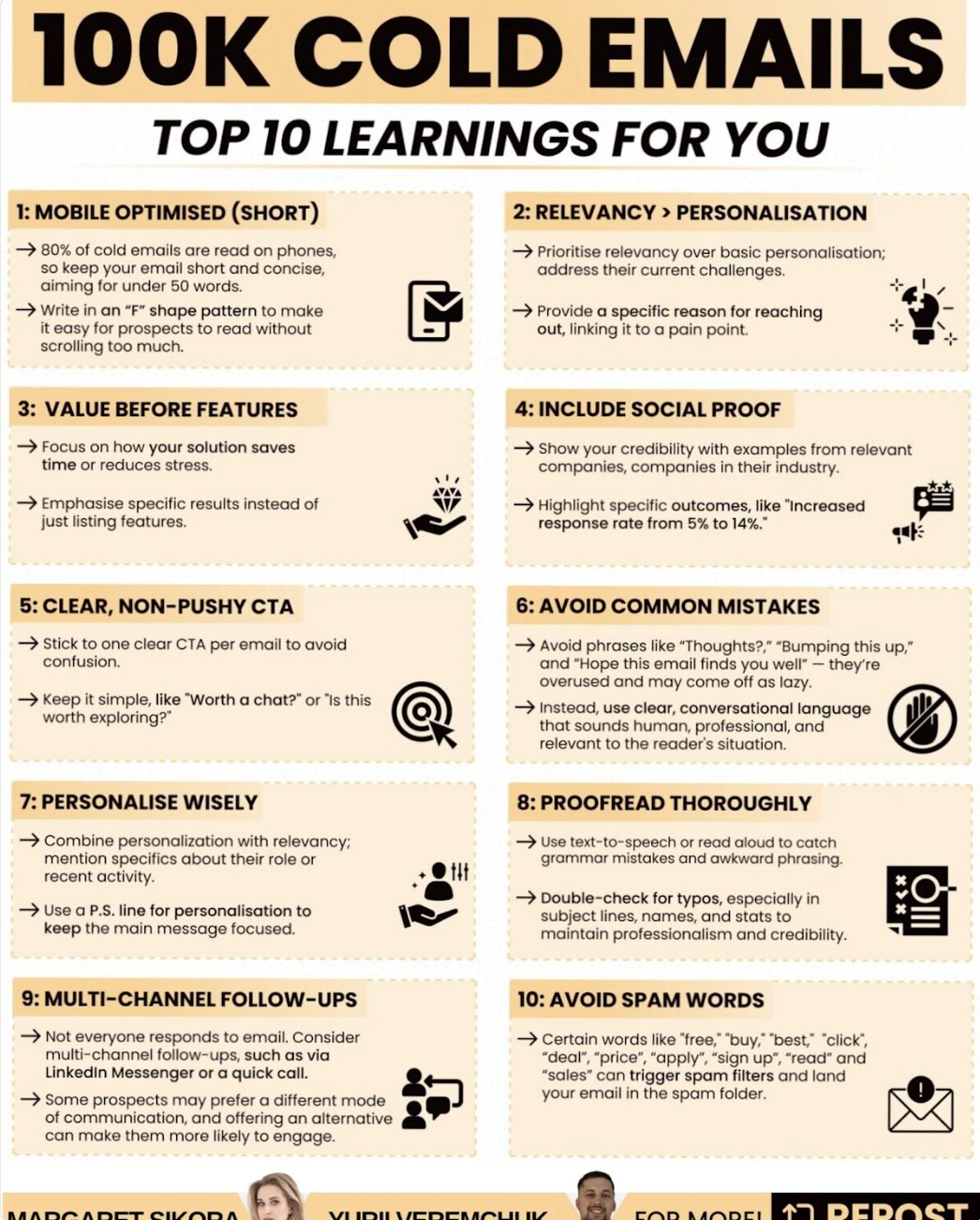
100,000 cold emails later.
100,000 cold emails later. 10 things that actually work: 1/ Short subject lines > flashy marketing ones - Think boring, internal, something that colleague would send - Keep it simple, no clickbait, under 3 words. 2/ Relevance > personalization - Focus on WHY NOW, instead of WHY ME - Work-related personalisation > interest based one 3/ Specificity > generic phrases - Your 1st line should scream "I did my homework." - Use Clay or Claude to find good intent for a punchy start 4/ Value > features - Nobody cares about your product/service. - Everyone's looking for "what's in it for me" 5/ Yes/No CTA > pushing for meetings - Pro tip: make saying "no" easy. - Reduce friction, build trust. 6/ Mobile-friendly > long emails - Email should fit on one screen. - No scrolling. No essays 7/ Use PS for personalization - Save personal interests for PS. - Let your main email focus on business value. 8/ Deliverability matters - Get a dedicated sending infrastructure like Maildoso - Make sure you get 95% inbox placement at least 9/ Lead list quality is king - Build a list of 500 people who have the problem you solve - Make sure it's valid list, bounce rate above 3% tanks your sender reputation 10/ Right offer > right copy - Bad offer + perfect email = no reply. Every time. - Most cold email problems are offer problems. PS. Give Margaret Sikora a follow on Linkedin. She's posting really cool & actionable cold email content. | 86 comments on LinkedIn
Linkedin.com
Mohan Muthoo
May 7, 2026 8:25 PM
The Secret to High-Quality Outbound Leads
12 sales methodologies and how you should use them in real deals:
Deals slow down because one of these elements is missing. - Clarity - Control - Urgency - Stakeholders Top reps don’t guess. They switch how they sell based on what the deal needs. Here’s how that actually looks: 1.SPIN Selling - Use questions to surface real pain and impact. - When the buyer sounds vague, this is how you find what actually matters. 2.MEDDIC - Lock in metrics, process, and decision players. -When a deal looks good on the surface, this is how you test if it’s real. 3.CHAMP - Focus on real business problems, not curiosity. - When you’re unsure if the deal is worth chasing, this clears it fast. 4. SPICED - Tie pain to a real event, timeline, or pressure. - When urgency feels soft, this is how you make it concrete. 5. Challenger Sale - Push the buyer to rethink their current approach. - When they are stuck or comparing options, this creates separation. 6. Command of the Sale - Take control of next steps and deal movement. - When things slow down or go quiet, this brings momentum back. 7. Buyer-Centric Selling - Match your process to how they actually make decisions. - When internal friction shows up, this reduces confusion. 8. Strategic Selling - Map influence, blockers, and power across the account. - When more people get involved, this keeps the deal stable. 9. SNAP Selling - Keep everything simple, clear, and fast to act on. - When attention is low, this keeps the deal moving. 10. Sandler Selling - Drive direct, honest qualification conversations. - When the buyer is guarded, this gets to the truth faster. 11. GAP Selling - Expose the cost of staying where they are. - When the pain feels “nice to fix,” this makes it urgent. 12. Winning by Design - Run deals through a consistent, repeatable process. - When teams rely too much on talent, this builds structure. Which one do you rely on the most? Want me to train your team to become elite closer killers? Let’s talk. DM me “Close” and let’s see if we’re a fit. Just opened 2 new open spots for May. First-come, first-served. Free gift: Grab my free GPT cold email generator that will save your next campaign. https://lnkd.in/dSiceii | 57 comments on LinkedIn
Linkedin.com
Alan Ruchtein
May 3, 2026 9:48 PM
12 SALES METHODOLOGIES AND HOW TOP REPS ACTUALLY USE THEM IN REAL DEALS
12 sales methodologies and how you should use them in real deals:
12 sales methodologies and how you should use them in real deals: Deals slow down because one of these elements is missing. - Clarity - Control - Urgency - Stakeholders Top reps don’t guess. They switch how they sell based on what the deal needs. Here’s how that actually looks: 1.SPIN Selling - Use questions to surface real pain and impact. - When the buyer sounds vague, this is how you find what actually matters. 2.MEDDIC - Lock in metrics, process, and decision players. -When a deal looks good on the surface, this is how you test if it’s real. 3.CHAMP - Focus on real business problems, not curiosity. - When you’re unsure if the deal is worth chasing, this clears it fast. 4. SPICED - Tie pain to a real event, timeline, or pressure. - When urgency feels soft, this is how you make it concrete. 5. Challenger Sale - Push the buyer to rethink their current approach. - When they are stuck or comparing options, this creates separation. 6. Command of the Sale - Take control of next steps and deal movement. - When things slow down or go quiet, this brings momentum back. 7. Buyer-Centric Selling - Match your process to how they actually make decisions. - When internal friction shows up, this reduces confusion. 8. Strategic Selling - Map influence, blockers, and power across the account. - When more people get involved, this keeps the deal stable. 9. SNAP Selling - Keep everything simple, clear, and fast to act on. - When attention is low, this keeps the deal moving. 10. Sandler Selling - Drive direct, honest qualification conversations. - When the buyer is guarded, this gets to the truth faster. 11. GAP Selling - Expose the cost of staying where they are. - When the pain feels “nice to fix,” this makes it urgent. 12. Winning by Design - Run deals through a consistent, repeatable process. - When teams rely too much on talent, this builds structure. Which one do you rely on the most? Want me to train your team to become elite closer killers? Let’s talk. DM me “Close” and let’s see if we’re a fit. Just opened 2 new open spots for May. First-come, first-served. Free gift: Grab my free GPT cold email generator that will save your next campaign. https://lnkd.in/dSiceii | 57 comments on LinkedIn
Linkedin.com
Enzo Carasso
May 3, 2026 9:44 PM
5 Psychology Principles That Move B2B Reply Rates
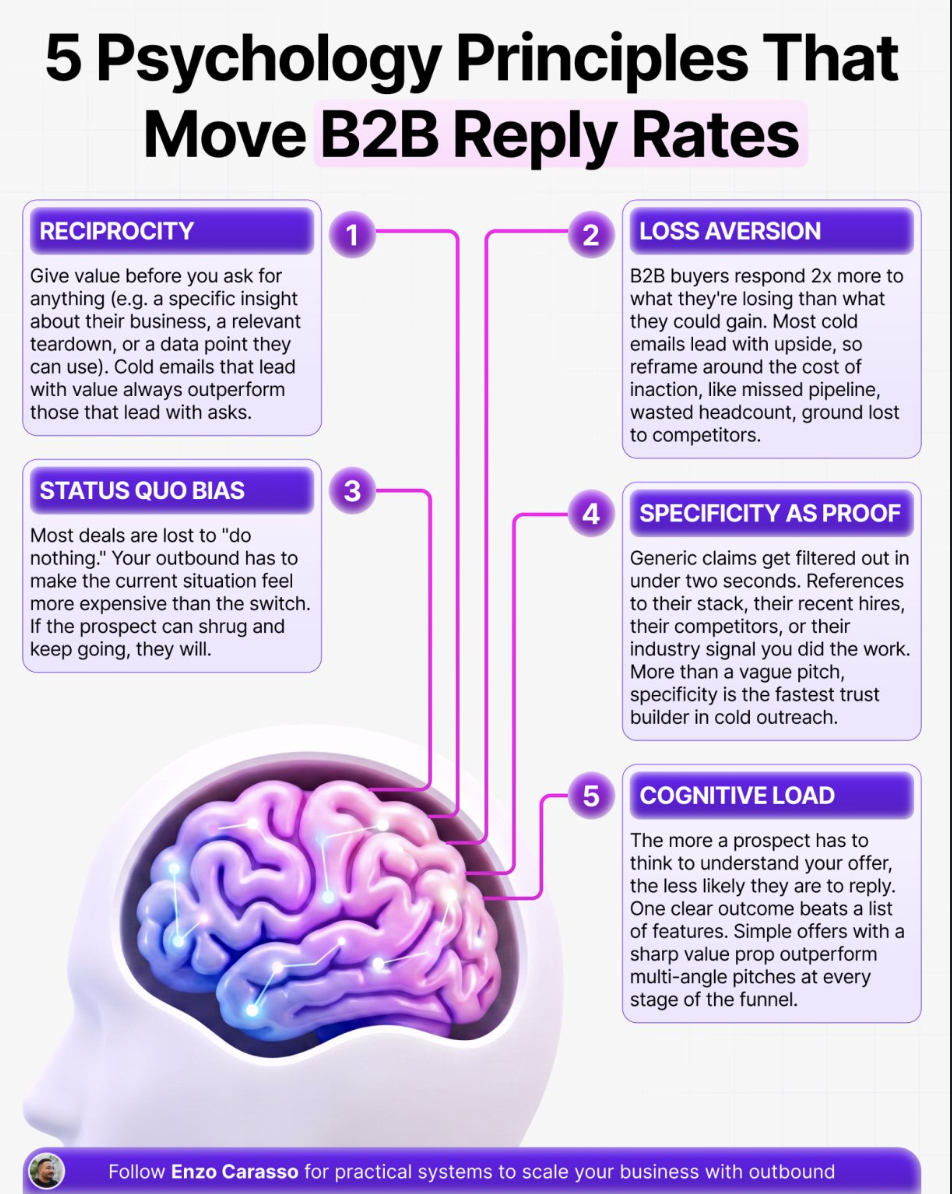
Something most companies get wrong… Reply rates aren’t just about targeting or copy. It’s about psychology. The best outbound teams: ✅ They understand how buyers think ✅ They remove friction… | Enzo Carasso 🧲 | 65 comments
Something most companies get wrong… Reply rates aren’t just about targeting or copy. It’s about psychology. The best outbound teams: ✅ They understand how buyers think ✅ They remove friction before it appears ✅ They design messages around real decision triggers Here are 5 psychology principles that drive replies: 1/ Reciprocity What it is: Giving value before asking for anything When to use it: In the first message 2/ Loss Aversion What it is: Making the cost of inaction clear When to use it: When framing the problem 3/ Status Quo Bias What it is: The tendency to do nothing instead of change When to use it: When positioning your offer 4/ Specificity as Proof What it is: Using precise details to build credibility When to use it: When making claims or referencing context 5/ Cognitive Load What it is: The effort required to understand your message When to use it: In your offer and call to action When you understand the psychology behind what makes your target audience move - and apply that to your approach - you start driving real ROI with your efforts. Want to see what this looks like in action? Apply for a no-cost pilot campaign with C17 Lab. We'll run you a small, no-cost, no-risk outbound campaign. (and let the results speak for themselves). Apply here: https://bit.ly/C17Pilot Repost this to help others in your network grow. Follow Enzo Carasso 🧲 for outbound systems and revenue execution. | 65 comments on LinkedIn
Linkedin.com
GTM News Feed
2.8K Posts
Share GTM News Feed
Bookmark The Feed
Newsletter
Go-to weekly newsletter for GTM operators, packed with actionable tutorials, tools, tips, templates, and free resources you can use immediately.
Top Contributors
Felix Frank
Penn Frank
Petr Kaliuzhny
Tyce Hilton
Nick Abraham
Eric Nowoslawski
Patrick Spychalski
Brigitta Ruha
Alan Ruchtein
Can Timağur
Nick Palasz
Adam Robinson
Tim Yakubson
Josh Whitfield
Alex Fine
Varun Anand
Harris Kenny
Kellen Casebeer
Michael Saruggia
🤖 Jacob Tuwiner
Brandon Charleson
Christian Oland
Matthew Putnam
Arnaud Belinga
Enzo Carasso
Abbas Somji
Mohan Muthoo
Yurii Veremchuk
Aaron Reeves
Hans Dekker
Nolan Ong
Thomas Nagy
Muhammad Rafay
Mark Timothy Agarrado
Done Miladinov
Stefan Mrvic
Load More...